Introduction,Microsof,t,WSUS,Server Update Services,to have an overview of all pending updates and to always roll out the latest updates automatically throughout the network.,It can only be used for Windows devices.,Further disadvantage:,It only works for Microsoft's own updates, no third-party software is updated with it. = Unsafe or requires manual updating work,,Today, however, third-party software updates and driver updates are also necessary. I don't want to know what our customers have installed on their devices. However, the patch management system from ManageEngine knows exactly and lists the pending updates for us:,Figure 1,How should an entire company network be kept up to date in the best case scenario? On the one hand, monitoring across all network devices, a maintenance contract where all network devices are updated on a recurring basis and a system that keeps the servers and clients up to date. The ManageEngine agent can be installed on Windows devices, Linux devices and Apple devices. This allows us to see all status information about the device in the ManageEngine dashboard and we can see the currently pending patches (updates).,How far does automation with ManageEngine go?,On Microsoft's Patchday, on the second Tuesday of each month, the latest patches for Windows servers and clients are released for rollout.,Depending on the configuration, ManageEngine searches all devices for patches that have been released for them every 24 hours, for example, and summarises them in a list. (According to Figure 1),We configure a new task for automatic patch updates,We select which Microsoft updates are to be updated,We select which third-party updates, virus protection updates and driver updates are to be updated,We configure a patch deployment policy e.g. based on the patch Tuesday and enter a time window at which the update should run through, we create scripts what should happen before the update (pre-script) and those that should be executed after the updates (post-scripts) e.g. a restart of the server or restarting certain services. Then you configure which notifications are to be sent to whom,There are company structures where not all servers can be updated at the same time because they are dependent on other server services. Any number of tasks can be configured and automated for server groupings. An IT specialist is then required to analyse the reports and, if necessary, make corrections where there were difficulties. Conclusion: A system that automatically rolls out patches on a monthly basis significantly increases the security of your infrastructure.
Company networks must always be up-to-date, there are no ifs and buts.
However, there are various ways to achieve this goal. Herewith a product recommendation
Alternative to WSUS
Many computer scientists work with the Microsoft WSUS (Windows Server Update Services)um eine Übersicht aller anstehenden Updates zu haben und um stets die aktuellen Updates im ganzen Netzwerk automatisiert auszurollen.
Disadvantage: Es kann nur für Windows Geräte eingesetzt werden.
Weiteren Nachteil: Es funktioniert nur für Hauseigene Updates von Microsoft, keine Drittherstellersoftware wird damit aktualisiert. = Unsicher oder hat Bedarf an manueller Aktualisierungsarbeit.
Heute sind aber auch Dritthersteller Software Aktualisierungen sowie Treiberaktualisierungen notwendig. Ich möchte jeweils nicht wissen, was unsere Kunden alles auf ihren Geräten installiert haben. Das Patch-Management System von ManageEngine weiss es aber ganz genau und listet uns die anstehenden Aktualisierungen dazu auf:
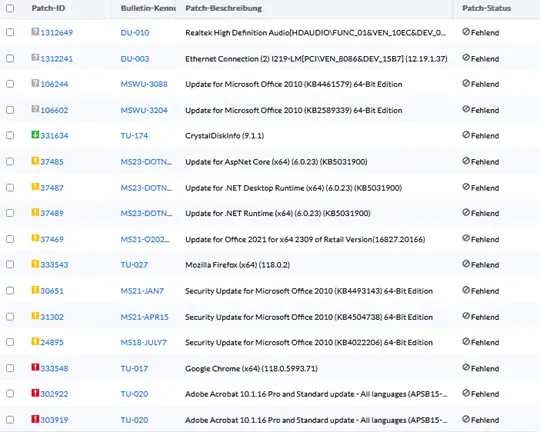
Wie soll im besten Fall ein ganzes Firmennetzwerk aktuell gehalten werden?
Dies erfordert mehrere Komponenten. Einerseits ein Monitoring über alle Netzwerkgeräte hinweg, einen Wartungsvertrag, wo sämtliche Netzwerkgeräte wiederkehrend aktualisiert werden und ein System welches die Server und Clients laufend aktuell hält.
Der Agent von ManageEngine kann auf Windows Geräte, Linux Geräte und Apple Geräte installiert werden. Damit sehen wir im ManageEngine Dashboard sämtliche Statusinformationen über das Gerät und wir sehen die aktuell anstehenden Patchs (Aktualisierungen).
Wie weit geht somit die Automatisierung mit MangeEngine?
Am Patchday von Microsoft, jeweils am zweiten Dienstag im Monat, werden die aktuellsten Patchs für Windows Server und Clients zum Rollout freigegeben.
ManageEngine sucht je nach Konfiguration z.B. alle 24h auf allen Geräten nach Patchs, welche für sie freigegeben wurden, und fassen die in einer Liste zusammen. (Gemäss Abbildung 1)
Wir konfigurieren eine neue Aufgabe zur automatischen Patch-Aktualisierung.
Wir wählen aus welche Microsoft Updates aktualisiert werden sollen.
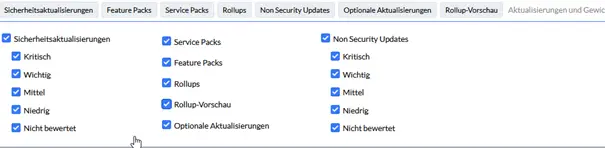
Wir wählen aus welche Drittanbieteraktualisierungen, Virenschutzaktualisierungen und Treiberaktualisierungen aktualisiert werden sollen.
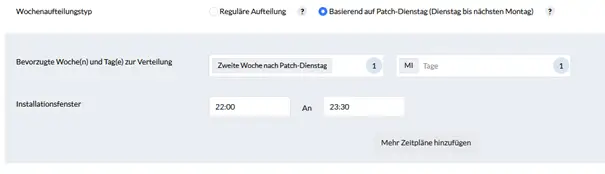
Wir konfigurieren eine Patch-Deployment Richtlinie z.B. basierend auf den Patch-Tuesday und geben ein Zeitfenster ein zu welcher Zeit die Aktualisierung durchlaufen soll.
Wir erstellen Scripts, was vor der Aktualisierung passieren soll (Pre-Script) und solche die nach den Aktualisierungen ausgeführt werden sollen (Post-Scripts) z.B. ein Neustart vom Server oder gewisse Dienste Neustarten. Danach wird konfiguriert welche Benachrichtigungen an wen Zugestellt werden soll.
Es gibt Firmenstrukturen, wo nicht alle Server gleichzeitig aktualisiert werden dürfen, weil sie Abhängig von anderen Server-Diensten sind. Da können beliebig viele Aufgaben für Server-Gruppierungen konfiguriert und automatisiert werden.
Anschliessend ist eine IT-Fachkraft gefragt, um die Berichte zu analysieren und allenfalls werden Nachkorrekturen dort benötigt, wo es Schwierigkeiten gab.
Fazit:
Ein System welches monatlich automatisch Patchs ausrollt, erhebt die Sicherheit Ihrer Infrastruktur erheblich. Technisch ist es möglich – Praktisch auch.


 Deutsch
  English (UK)
  Français
  Italiano