Background
A Swiss company creates and manages its customer invoices in Zoho Books. To ensure that the invoices also include a QR payment slip, external software is required to generate the QR invoice.
Until now, the finalised invoice had to be created or amended outside Zoho Books. It then had to be reassigned to the correct invoice record. This extra step made the process more cumbersome and made it more difficult to manage invoice documents centrally.
Objective
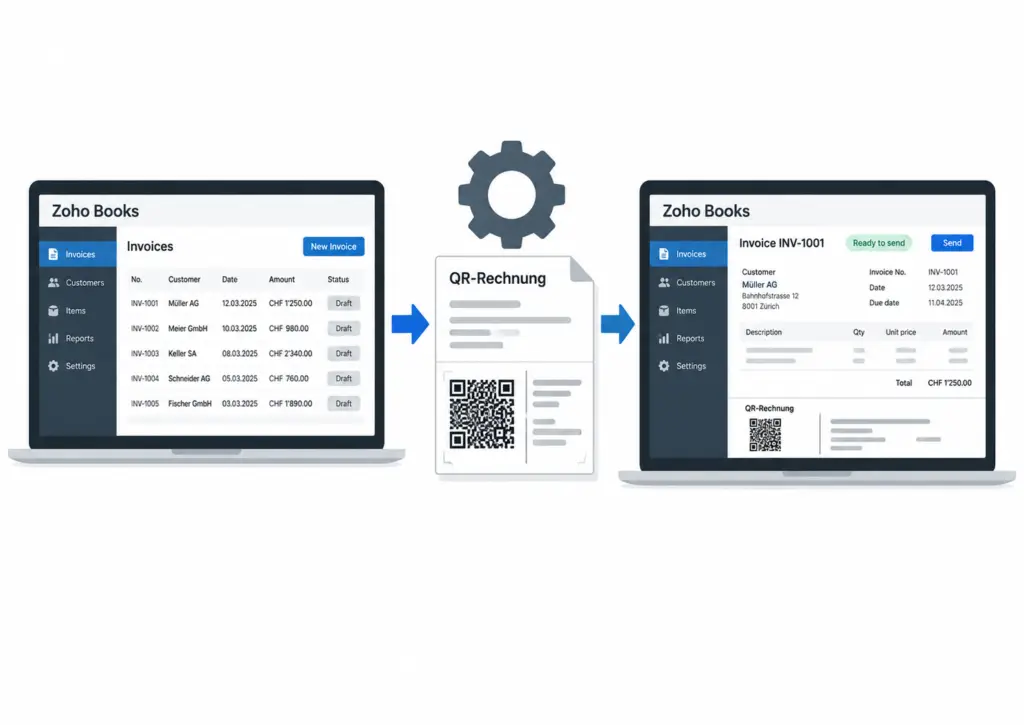
The aim of the project was to integrate QR invoicing into the existing invoicing process. Zoho Books remains the central hub where invoices are created, checked and sent to customers.
The external software is used solely to generate the QR payment slip, thereby completing the invoice. The finalised invoice is then returned to Zoho Books, where it is ready to be sent.
Implementation
Once an invoice has been created in Zoho Books, the necessary invoice details are transferred to the external QR invoice software. There, the corresponding QR payment slip is generated and inserted into the invoice document.
Once the QR invoice has been finalised, the complete document is sent back to Zoho Books and linked to the relevant invoice record. Staff can view and check the finalised invoice in Zoho Books before sending it directly to the customer from the system as usual.
Result
This integration allows the external QR invoice software to be incorporated into the existing workflow. The invoice continues to be managed in Zoho Books, whilst the external software adds the QR payment slip. The final document is then returned to Zoho Books, from where it can be sent.
This means that both the invoice and its version ready for dispatch are stored in one central location. The process is more straightforward, and the need for manual processing outside Zoho Books is reduced.
Your Zoho partner in Switzerland:
Flynn Supporter GmbH
Do you have any questions?
We will be happy to help you.

 Deutsch
  English (UK)
  Français
  Italiano